
In Part 1, we covered the fundamental loop that drives AI agents: Input → Reason → Act → Observe → Repeat. That loop is the engine. But every engine runs within constraints.
This article explores three critical concepts that shape how agents operate:
- The context window — The agent's working memory and its limits
- Tools — How agents take action in the real world
- Termination — How agents know when they're actually done
Understanding these mechanics helps you work within the system's constraints rather than fighting against them.
The Context Window: Working Memory
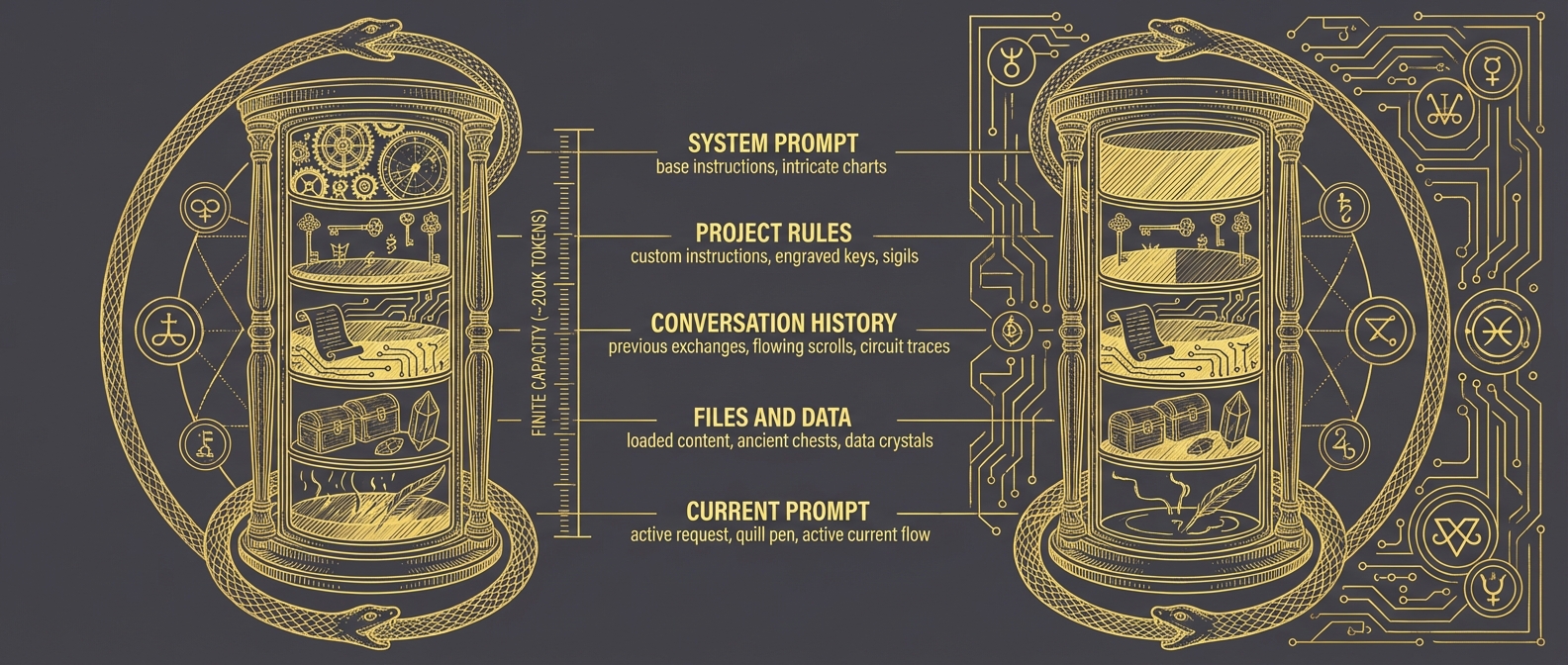
The context window is everything the agent can consider at once. Think of it as the agent's desk—only what's on the desk can influence the current decision.
┌─────────────────────────────────────────────────────────────────┐
│                    THE CONTEXT WINDOW                           │
├─────────────────────────────────────────────────────────────────┤
│                                                                 │
│   ┌─────────────────────────────────────────────────────────┐   │
│   │   SYSTEM PROMPT                                         │   │
│   │   Base instructions, personality, constraints           │   │
│   ├─────────────────────────────────────────────────────────┤   │
│   │   YOUR PROJECT RULES                                    │   │
│   │   Custom instructions for this codebase                 │   │
│   ├─────────────────────────────────────────────────────────┤   │
│   │   CONVERSATION HISTORY                                  │   │
│   │   Previous messages, tool calls, results                │   │
│   ├─────────────────────────────────────────────────────────┤   │
│   │   FILES AND DATA LOADED                                 │   │
│   │   Code, configs, logs you've pulled in                  │   │
│   ├─────────────────────────────────────────────────────────┤   │
│   │   CURRENT PROMPT                                        │   │
│   │   What you're asking right now                          │   │
│   └─────────────────────────────────────────────────────────┘   │
│                                                                 │
│   LIMIT: ~200,000 tokens (roughly 500 pages of text)            │
│                                                                 │
└─────────────────────────────────────────────────────────────────┘
That sounds like a lot—500 pages. But it fills up faster than you'd expect.
Why Context Limits Matter
Here's the uncomfortable truth: you're always in competition for context space.
Your project rules compete with conversation history. The files you've loaded compete with the system prompt. As conversations grow longer, earlier context gets pushed toward the margins.
For security practitioners, this has practical implications:
Loading entire log files is expensive. That 10,000-line auth log you just asked the agent to analyze? It's consuming context that could be used for reasoning. Sometimes that's necessary. Often, filtering first is smarter.
Long investigations accumulate baggage. By hour two of an incident investigation, your conversation history might be consuming half the available context. The agent is reasoning with one hand tied behind its back.
Your rules are always present. Whatever you've configured as standing instructions takes up space on every single interaction. Keep them focused.
The skill here is context curation—being strategic about what information you bring into the window and when.
Practical Context Management
Think of context management like managing an investigation workspace:
| Situation | Strategy |
|---|---|
| Starting fresh task | Reset conversation to clear history |
| Loading large files | Filter or excerpt before loading |
| Long-running investigation | Periodically summarize and reset |
| Multiple parallel threads | Separate conversations per thread |
| Standing instructions | Keep them minimal and high-signal |
The agent can't manage its own context—you have to do it. When you notice degraded performance in long conversations, context exhaustion is often the culprit.
Tools: How Agents Take Action
Agents aren't just text generators with opinions. They can take real actions in the real world through tools.
┌─────────────────────────────────────────────────────────────────┐
│                    AGENT TOOLS                                  │
├─────────────────────────────────────────────────────────────────┤
│                                                                 │
│   BUILT-IN TOOLS (typical coding agents):                       │
│   ├── Read       → Read file contents                           │
│   ├── Write      → Create or overwrite files                    │
│   ├── Edit       → Modify existing files                        │
│   ├── Bash       → Execute shell commands                       │
│   ├── Search     → Find files or content patterns               │
│   └── ...        → Many more depending on the agent             │
│                                                                 │
│   EXTENDED TOOLS (via MCP or plugins):                          │
│   ├── Database queries                                          │
│   ├── API integrations                                          │
│   ├── Custom security tools                                     │
│   └── Anything you configure                                    │
│                                                                 │
└─────────────────────────────────────────────────────────────────┘
When an agent decides to use a tool, here's what happens:
- Agent reasons that it needs information or needs to take action
- Agent specifies which tool to use and with what parameters
- Tool executes outside the model (this is real execution, not simulation)
- Results return to the agent
- Agent incorporates results and continues reasoning
That third step is crucial: tool execution is real. When the agent writes a file, the file exists. When it runs a command, the command executes. This isn't roleplay.

Tools for Security Work
The extensibility of tools is where things get interesting for security practitioners. Out of the box, an agent can read files and run commands. But with proper configuration, you can extend this to:
- Query your SIEM directly
- Check indicators against threat intel APIs
- Pull logs from specific timeframes
- Execute forensic collection scripts
- Interface with ticketing systems
The agent's reasoning capabilities combined with security-specific tools creates something more powerful than either alone. The agent can decide what to query based on its analysis; the tools give it the ability to query.
This is the foundation of agentic security workflows—but that's a topic for another article.
How Agents Know They're Done
The "decide if done" step in the agent loop deserves its own examination. How does an agent know when a task is complete?
There's no single answer. Different systems use different approaches:
┌─────────────────────────────────────────────────────────────────┐
│                 TERMINATION STRATEGIES                          │
├─────────────────────────────────────────────────────────────────┤
│                                                                 │
│   1. SELF-DETERMINED (LLM Judgment)                             │
│      Agent reasons about whether the goal is met                │
│      "I've analyzed the logs, identified the IOCs,              │
│       documented findings → task complete"                      │
│      ↳ Flexible, but can miss edge cases                        │
│                                                                 │
│   2. DETERMINISTIC VERIFICATION                                 │
│      External check with clear pass/fail                        │
│      "Run detection → alert fires → working"                    │
│      "Execute test suite → all pass → done"                     │
│      ↳ Unambiguous, but only for verifiable tasks               │
│                                                                 │
│   3. EVALUATOR AGENT                                            │
│      Separate model reviews the work                            │
│      Agent A investigates, Agent B validates findings           │
│      ↳ Catches errors, but adds latency and cost                │
│                                                                 │
│   4. HARD LIMITS                                                │
│      External constraints force stop                            │
│      Maximum iterations, token budget, timeout                  │
│      ↳ Safety net, not true completion detection                │
│                                                                 │
│   5. HYBRID APPROACHES                                          │
│      Combinations for robustness                                │
│      "Agent thinks done → run verification → confirm"           │
│      ↳ Most reliable for production workflows                   │
│                                                                 │
└─────────────────────────────────────────────────────────────────┘
Termination in Practice
Most coding agents today use a hybrid of self-determination and deterministic verification:
- For tasks with clear success criteria ("make the tests pass"), the agent reasons until it believes it's done, then verifies with actual test execution
- For open-ended tasks ("review this code for security issues"), the agent relies primarily on its own judgment about completeness
This is why clear success criteria matter. When you give the agent a verifiable goal, it can use deterministic termination. When the goal is fuzzy, you're relying on the model's judgment—which is good but not perfect.
Compare:
Fuzzy: "Improve the detection coverage"
Agent decides it's done based on... vibes? It added some rules, seems like more coverage, probably done.
Clear: "Write detections for T1003.001 through T1003.004 and verify each fires against the test samples in /tests/credential-access/"
Agent has explicit completion criteria: four techniques covered, each verified against samples.
You don't always need perfectly crisp criteria—sometimes exploration is the point. But when precision matters, define what "done" looks like.
Putting It Together
These three concepts interact constantly:
Context limits force tool use. You can't load a million-line log file into context—so the agent queries it through tools, bringing back only relevant excerpts.
Tool results consume context. Every search result, every file read, every command output goes into the context window. Verbose tools fill context fast.
Termination depends on context. The agent can only reason about completion based on what's in its context window. If critical information got pushed out by a long conversation, the agent might terminate prematurely.
Understanding these interactions helps you debug problems. Agent gave a shallow answer? Maybe context is exhausted. Agent keeps running without finishing? Maybe success criteria are unclear. Agent missed something obvious? Maybe the relevant information never made it into context.

Practical Implications
| Understanding | Changed Behavior |
|---|---|
| Context is finite | Curate information strategically |
| History accumulates | Reset when switching major tasks |
| Tools have real effects | Review before authorizing destructive actions |
| Termination needs criteria | Define what "done" looks like |
| Everything competes for context | Keep rules and prompts focused |
What You Don't Need to Know
This article deliberately skipped:
- Transformer architecture and attention mechanisms
- Token prediction and sampling strategies
- Training data composition
- Specific API implementations
These matter if you're building models. For working effectively with agents, the conceptual model we've covered is sufficient. You don't need to understand internal combustion to drive a car well—but you do need to understand that the car needs fuel and has a turning radius.
Key Takeaways
Context window = working memory. Finite space that everything competes for. Manage it actively.
Tools = real capabilities. Agents can read, write, execute, query. These actions have real effects.
Termination varies. Self-determined, verified, evaluated, or hard-limited. Clear criteria help.
These concepts interact. Context limits drive tool use. Tool results consume context. It's all connected.
Where to Go From Here
With the agent loop (Part 1) and these operational concepts (Part 2), you have a working mental model of how AI coding agents function. You understand the cycle, the constraints, and the mechanics.
The next step is learning how to communicate effectively within this system. That means shifting from imperative instructions ("do X, then Y, then Z") to declarative goals ("achieve this outcome"). That shift—the declarative mindset—is where the real leverage comes from.